My 17 Pro Max was a year old and there was nothing wrong with it. I replaced it anyway, which means I have had both phones on the desk for a few days, and I went through the new one a setting at a time instead of restoring a backup and carrying on.
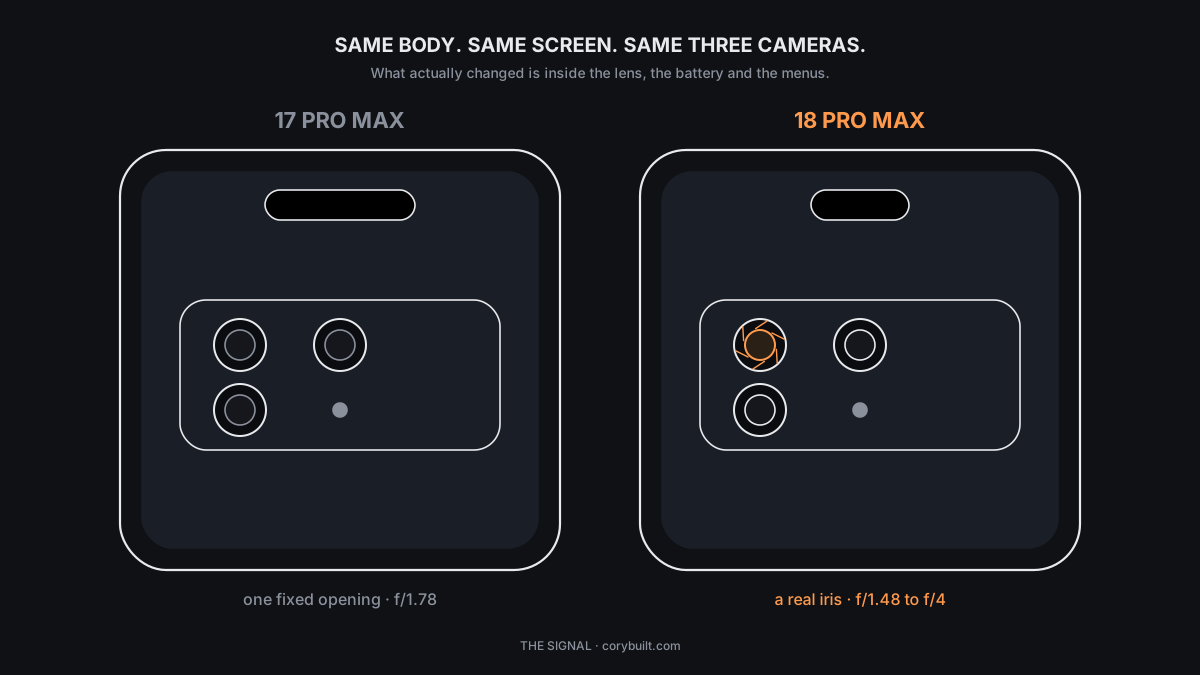
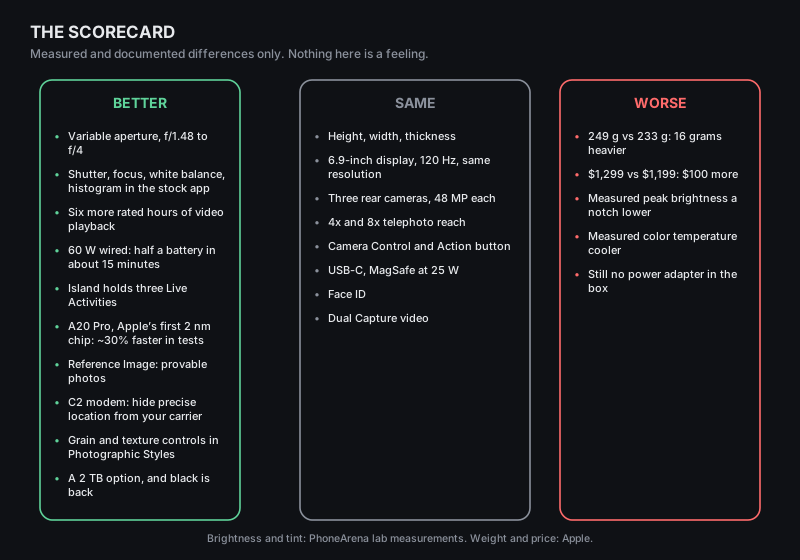
Here is what that turned up. The two phones are the same height, width and thickness. The screen is the same 6.9 inches at the same resolution. There are still three 48-megapixel cameras on the back with the same 4x and 8x reach. If you are hoping someone across the room will notice you upgraded, they will not, unless you bought the burgundy one.
Everything that changed is either inside the phone or inside a menu. Seven of those changes are worth your time. Two of them make the phone worse. I will take them in the order I found them.
The camera has a real iris now, and you set it yourself
Every iPhone before this one had a main lens with a single fixed opening. The 17 Pro Max's was f/1.78 and it never moved. When Portrait mode blurred the background, software did the blurring, which is why hair and glasses sometimes went wrong at the edges.
The 18 Pro Max's main lens has six metal blades that physically open and close, the way a camera lens has for a hundred years. You get four settings: f/1.48, f/1.8, f/2.8 and f/4. The rule, if you have never shot with a real camera: the smaller the number, the bigger the hole, the more light gets in and the blurrier the background goes. The bigger the number, the smaller the hole, and the more of the scene is sharp from front to back.
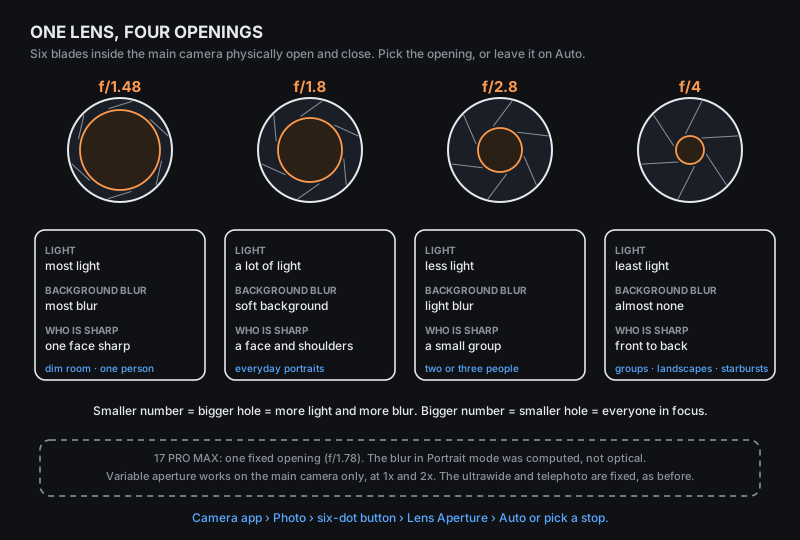
What this means on a Tuesday: at a restaurant with one person across from you, f/1.48 gathers more light than the old phone could and melts the room behind them, without software guessing where their ear ends. At a birthday table with six people in a row, f/4 gets every face sharp, which the old phone could not do at all once it decided to blur. And at f/4, a bright point of light, a streetlamp or a candle, blooms into a star. That is the blades, not an effect.
The steps:
- Open Camera and stay in Photo mode.
- Tap the six-dot button at the bottom of the screen, to the left of the shutter.
- Tap Lens Aperture.
- Leave it on Auto, or pick a stop.
Two limits. It only works on the main camera, at 1x and 2x. The ultrawide and the telephoto still have fixed openings. And Auto is good; the phone reads the scene and picks for you. Set it by hand when you know what you want, and let it alone when you do not.
The manual controls you used to pay for are in the stock app
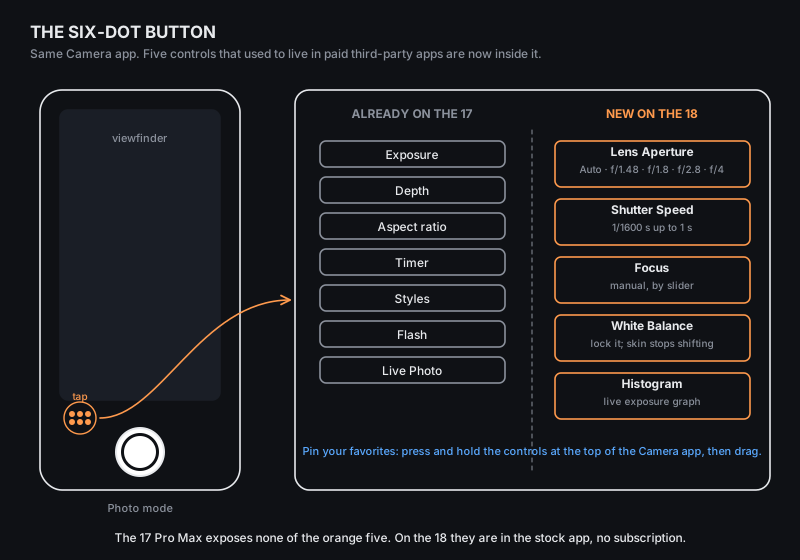
The aperture is the headline, but when I opened the six-dot panel I counted five things that were not there on the 17 Pro Max: Lens Aperture, Focus, Shutter Speed, White Balance and a live Histogram. Until now you got those by paying for a third-party camera app. Now they are in the app that opens from the lock screen.
Three recipes that each use one of them:
Lock the white balance when you walk from room to room. Kitchen light is yellow, the living room is blue from the TV, the porch is orange. Left on auto, your skin changes color between shots of the same evening. Tap White Balance, set it once, and every photo matches.
Turn headlights into streaks. Tap Shutter Speed and drag it toward 1 second. Prop the phone on a wall or a car roof, because at one second your hands will blur everything. Traffic becomes ribbons of light. The range runs from 1/1600 of a second, which freezes a dog mid-leap, up to one full second.
Read the histogram before you shoot a sunset. The histogram is a small graph of how bright the pixels are. If the hump is jammed against the right edge, the bright parts are gone and no amount of editing will bring them back. Drag exposure down until the hump moves off the wall. This is the single most useful thing a photography class teaches, and it is now a toggle.
One more thing nobody told me: you can rearrange the Camera app. Press and hold on the controls at the top of the screen and drag Aperture or Histogram up there. After that they are one tap away, not three.
The fast charge is real, and your charger probably cannot do it
Apple says the 18 Pro Max goes from empty to 50 percent in about 15 minutes. The 17 Pro Max took about 20 minutes to do the same. Independent testing agrees with the new number: 50 percent at the 15-minute mark and 81 percent at 30, against 38 and 65 for the old phone.
The catch is in a footnote. The fastest wired charging requires a USB-C cable rated for 60 watts and a power adapter that can supply 60 watts or more with a feature called Adjustable Voltage Supply, or AVS. There is no adapter in the box. There never is anymore.
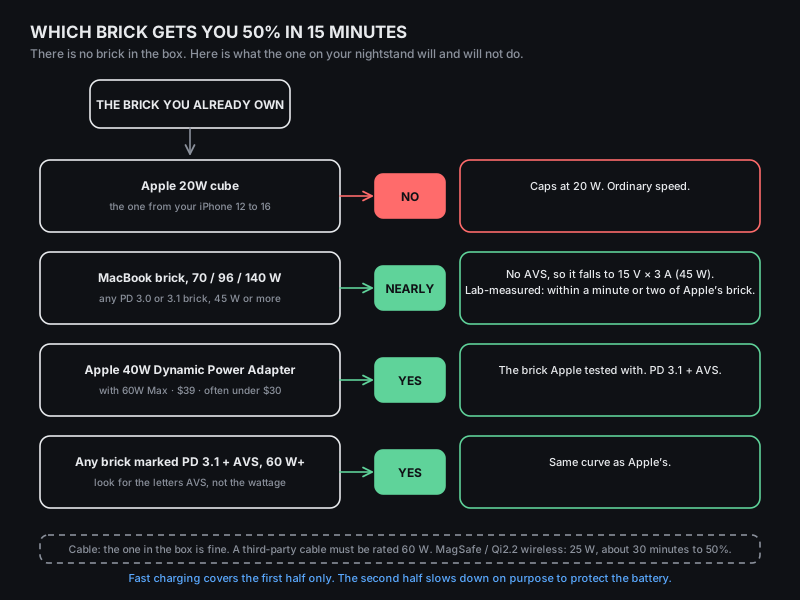
So I checked the drawer. The white 20-watt cube that shipped with every iPhone from the 12 through the 16: no. It tops out at 20 watts and the new phone charges at ordinary speed on it. The big MacBook brick, 96 or 140 watts: mostly yes, and this is the part the spec sheet hides. A lab that put a USB protocol analyzer between the phone and a 140-watt UGREEN brick found the phone could not get AVS from it, dropped to a plain 15 volts at 3 amps, which is 45 watts, and still reached 10, 50 and 90 percent within a minute or two of Apple's own adapter. The Pro Max gives up a hair more than the smaller Pro, because it wants to draw its full 3 amps at 17 volts, about 51 watts, and the fallback caps it at 45. A hair.
If you want the exact curve Apple tested with, the adapter is the Apple 40W Dynamic Power Adapter with 60W Max. The name is confusing on purpose: it sustains 40 watts and peaks at 60, and it is the one brick you can be sure speaks AVS. Apple sells it for $39, and Best Buy has had it under $30. The cable in the box is fine. If you buy a different cable, it must be rated for 60 watts; a lot of pretty braided ones are not.
Two honest notes. Fifteen minutes to half is the first half only; the second half slows on purpose to protect the battery, so a full charge is not 30 minutes. And wireless is not in this race: MagSafe and Qi2.2 pads run at 25 watts and take about 30 minutes to reach half.
The Island shrank and holds three things
The Dynamic Island, the pill at the top of the screen, is narrower on the 18 Pro Max because Apple moved the Face ID flood illuminator under the glass. One review measured it at 13.5 millimeters wide against 20.8 on the 17 Pro Max. Face ID works exactly as before; you just see more wallpaper.
The useful part is what the smaller pill can do. The old Island showed one Live Activity in full and tucked a second into a dot at the edge. The new one shows three, side by side, on any screen.
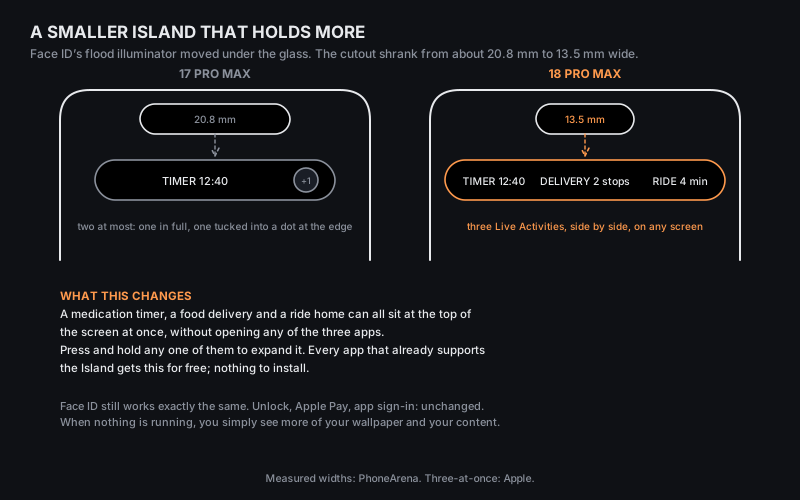
Here is where that matters. A kitchen timer, a food delivery and a ride home, all running, all visible at the top of whatever app you are in, with none of the three opened. For anyone who looks after someone else, the medication timer no longer disappears when the pharmacy text arrives. Press and hold any of the three to expand it. Every app that already supports the Island gets this without an update, because it is the system doing the arranging.
Siri AI is not on. You apply for it, then you wait.
If you are coming from a 17 Pro Max you already had Apple Intelligence. What the 18 ships with is iOS 27 and the new Siri, and the new Siri is a beta you have to join.
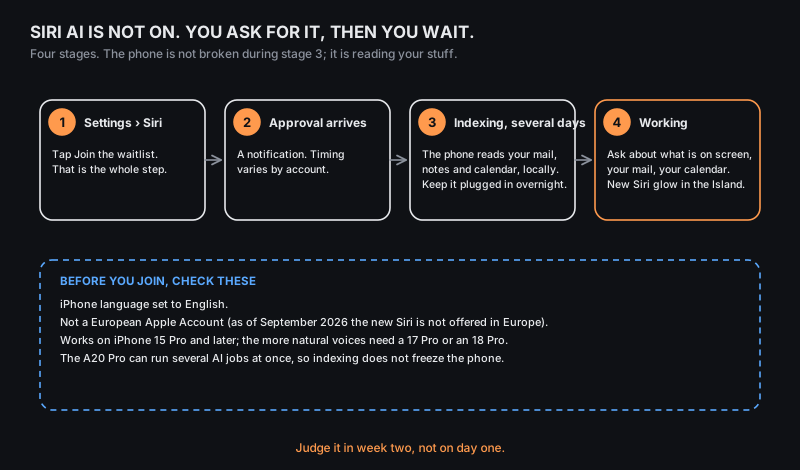
Before you join, check three things: the phone's language is English; your Apple Account is not a European one, since the new Siri is not offered in Europe as of September; and you are on an iPhone 15 Pro or later. The more natural-sounding voices need a 17 Pro or an 18 Pro. Then go to Settings, tap Siri, and tap the waitlist. That is the whole step.
When approval comes, nothing visible changes for a while. The phone has to index your messages, notes, calendar and mail on the device before Siri can answer questions about them, and that takes days. Leave it plugged in overnight. The A20 Pro can run several of these jobs at once without the phone freezing, which is a real change from the 17; it has 50 percent more memory bandwidth feeding the Neural Engine. But bandwidth does not shorten the calendar. Judge the new Siri in week two, not on day one. Once it is working, you get a new glow in the Island and an assistant that can see what is on your screen and what is in your inbox.
A photo you can prove is real
This is the one I did not know existed until I scrolled to the bottom of the Camera settings. It is called Apple Reference Image, it is off by default, and it exists on exactly two phones: the 18 Pro and the 18 Pro Max. The iPhone Duo does not have it. The 17 Pro Max cannot be updated into it, because the proof starts in the sensor.
In Reference mode, the camera sensor signs the pixels with a private key that was created inside that sensor at the factory, before iOS ever sees the image. The phone keeps a locked digital negative beside the normal photo, with the time it was shot. When you want proof, Apple's Private Cloud Compute checks that the signature matches that sensor and that nothing has been altered, and turns the negative into a verified copy anyone can check. The verified copy does not say who took the picture. It says a real iPhone sensor saw this, at roughly this time, and it has not been touched since.
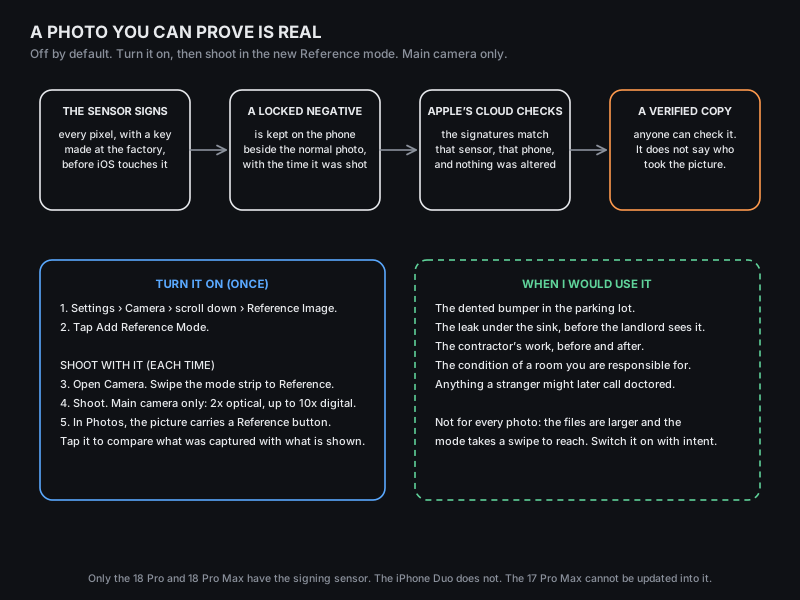
Turn it on once: Settings, Camera, scroll to the bottom, Reference Image, then Add Reference Mode. Shoot with it each time: open Camera and swipe the mode strip until you reach Reference. Main camera only, 2x optical and up to 10x digital. In Photos, the picture carries a Reference button; tap it to compare what the sensor captured with what is being shown.
I would not leave it on. The files are larger and the mode takes a swipe to reach. I would switch it on for the dented bumper in the parking lot, the leak under the sink before the landlord sees it, the contractor's work before and after, the condition of a room I am responsible for, and anything a stranger might later call doctored. Six months ago a photo was a claim. On this phone it can be a receipt.
Two settings worth five minutes
Hide your exact location from your carrier. The 18 Pro is the first Pro iPhone with Apple's own cellular modem, the C2, and that unlocks a privacy switch the 17 Pro Max never had. Go to Settings, Cellular, Cellular Data Options, and turn on Limit Precise Location. On a supported carrier, your provider stops receiving your precise position. Apple says it does not affect signal, emergency services or Find My. It affects what your carrier can sell.
Give your photos grain. Photographic Styles gained a Texture tab with three options, Soft Skin, Glow and Film, plus a grain slider. Settings, Camera, Photographic Styles sets a default. You can also apply them after the fact in the Photos editor under Styles, then Customize, then Texture, so you do not have to decide before you shoot.
The honest numbers on battery and speed
Apple rates the 18 Pro Max for six more hours of video playback than the 17 Pro Max. The independent tests do not agree with each other on how big the gap feels. One web-browsing test ran the new phone for 29 hours and 38 minutes against 20 hours and 9 minutes for the old. Another lab's mixed test found 18 hours and 27 minutes against 17 hours and 54 minutes. The difference is what the test asks the phone to do. In browsing-heavy use the gain is large. In the usual mix of screen time, it is a half hour.
The A20 Pro is Apple's first chip on a 2-nanometer process, and it scores roughly 30 percent higher than the A19 Pro on both CPU and graphics, with a Neural Engine that grew to 32 cores. The number I noticed is not the peak but how long it holds the peak. There is a larger heatsink and a next-generation vapor chamber inside, which is part of why the phone weighs more, and it means a long export or a long game does not slow to a crawl at the ten-minute mark.
The two ways it is worse
It is heavier. 249 grams against 233, by Apple's own figures. Sixteen grams is three quarters in your pocket. You feel it in a shirt pocket and you feel it holding the phone one-handed in bed. The battery and the heatsink are the reason, and I would make the trade again, but it is a trade.
The screen measured slightly worse in one lab. PhoneArena's instruments found a lower peak brightness, 2,333 nits against 2,689, and a cooler color temperature, 7,451 kelvin against 6,801. Apple's rated figures are identical for both phones, and I could not see the difference holding them side by side. A lab could.
It also costs $100 more. The 18 Pro Max starts at $1,299 for 256 gigabytes, and there is now a 2-terabyte tier if you shoot a lot of ProRes video. Black is back on the color list after a year away, alongside silver, glacier and burgundy.
Should you do what I did
If you are on a 17 Pro Max and you have never opened the six-dot panel: no. Keep it. Your phone is one year old and nearly all of this is a camera story. Apple stopped selling the 17 Pro Max the day the 18 was announced, which tells you how close the two are.
If you shoot people, food, your kids, or anything you later want to prove: yes, and the aperture and Reference Image are the reasons. Buy the $39 brick with it.
If you are on a 16 Pro or older: this is two years of changes in one box, including last year's telephoto and selfie camera, and the battery alone will change how often you think about charging.
What I did not expect was that the biggest change had nothing to do with speed. It is that the camera stopped guessing on my behalf, and started asking what I wanted.