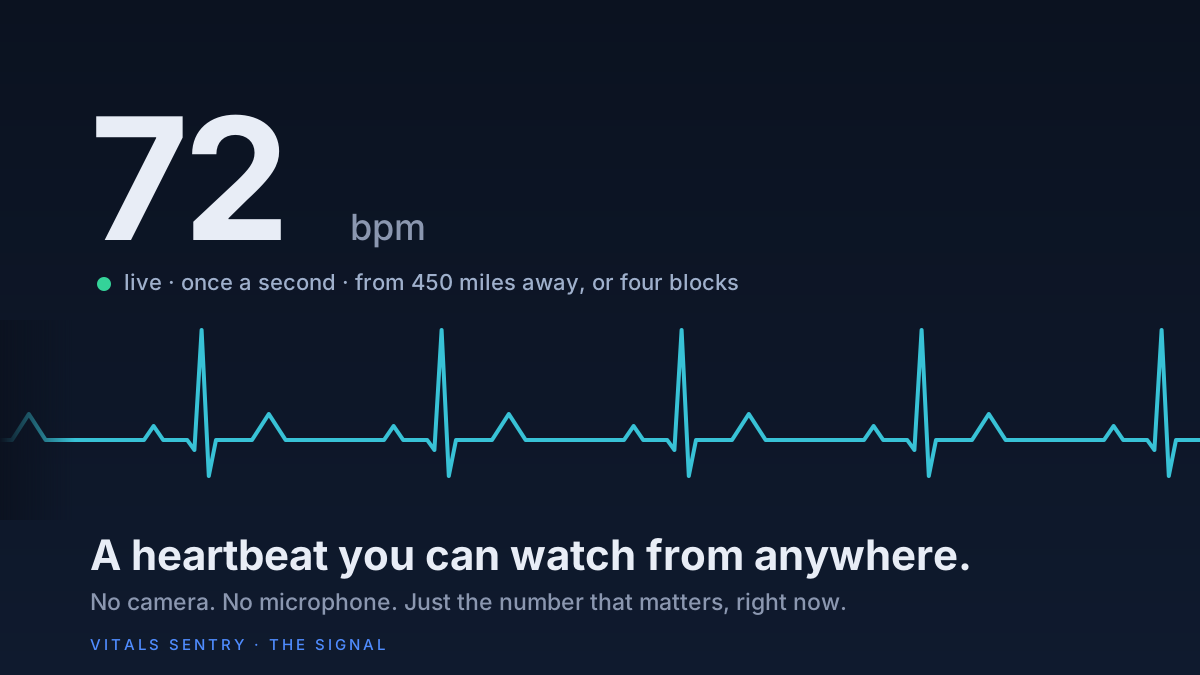
There is an iPad on my kitchen counter. It shows one number, and the number changes once a second. It is the heart rate of the man I look after, read off the strap on his wrist, sent through the phone in his pocket, and drawn on my screen before he has finished the breath that produced it.
I have looked after him for seven years. Most of that time we are four blocks apart, and the screen is just a screen. The nights it matters are the ones when we are 450 miles apart and I am not the one in the room. I need to know he got there, that he is being looked after, that he is asleep and his heart is doing what it should. Somewhere along the way, looking at that number before I turned out the light stopped being a check and became the thing that let me sleep.
No camera is pointed at him. No microphone is listening. Nobody is tracking where he goes. If his heart does something it should not, every screen in my house turns red and makes a noise until I tap one button, and my phone and my watch get the same message whether or not a screen is open. The rest of the time the number just sits there, quietly, telling me he is fine.
I built it because I could not buy it. This piece is about what it is, what it is for, what it refuses to do, and where it goes from here. There is also a section near the end about building it with AI, because that part was not what I expected and I think it is the most useful thing in here.

The problem with every other way to do this
If you look after someone who does not live with you, you already know the options. You can call. You can put a camera in the room, which the person on the other end of it never forgets. You can share Apple Health, which is a good feature that delivers yesterday's readings, or this morning's, but never this minute's. You can buy a pendant that calls a monitoring center after a fall, which is useful and also tells you nothing until the worst has already happened.
What none of them give you is the thing you actually want at eleven at night: a glance, and the knowledge that right now, this second, the person is okay. Not a reading from this afternoon. Now. Hospitals have had that screen since the 1960s. Families have not.
What it does
Vitals Sentry is a real-time monitor, in the sense a hospital means it, and it is three parts. A small app on the phone of the person being looked after. A cloud service that stores readings and checks them. And a screen for the people watching: a web page that installs to a phone, an iPad, a Mac, or an old tablet on the wall, plus an iPhone app for caregivers that does the same with a siren and a lock screen.
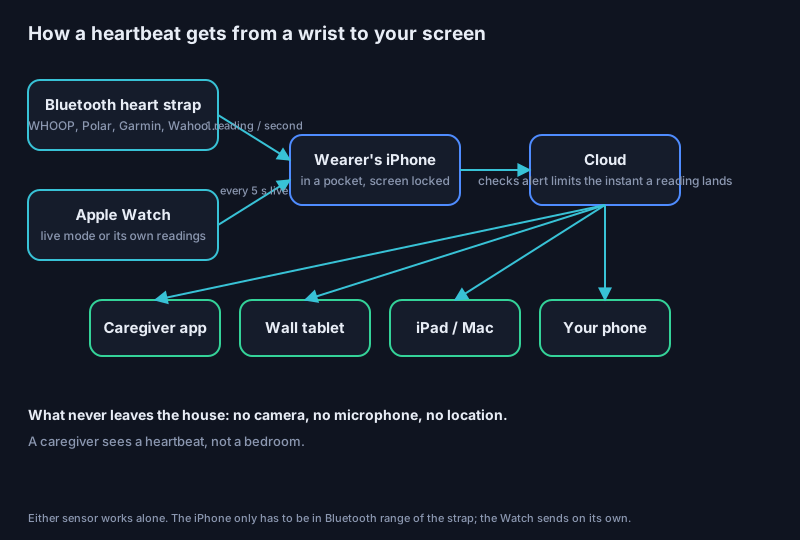
The wearer's side is the part I spent the most care on, because the whole thing fails if it needs anything from them. It listens for any heart monitor that broadcasts the standard Bluetooth heart-rate signal: a WHOOP with broadcast turned on, a Polar or Garmin or Wahoo strap, the cheap chest straps cyclists wear. Once a second, the phone receives a beat and sends it on. The phone can be locked, in a pocket, on a nightstand. There is nothing to press. If the strap goes out of range, the phone picks it back up by itself when it returns.
Apple Watch is the other path. The Watch records heart rate every few minutes on its own, plus blood oxygen, breathing rate, heart-rate variability and wrist temperature overnight, and the app uploads every one of those the moment Apple records it. For second-by-second, the Watch has a live mode, which costs battery, so it is for when you want to look closely, and you can switch it on from your own phone without touching theirs.
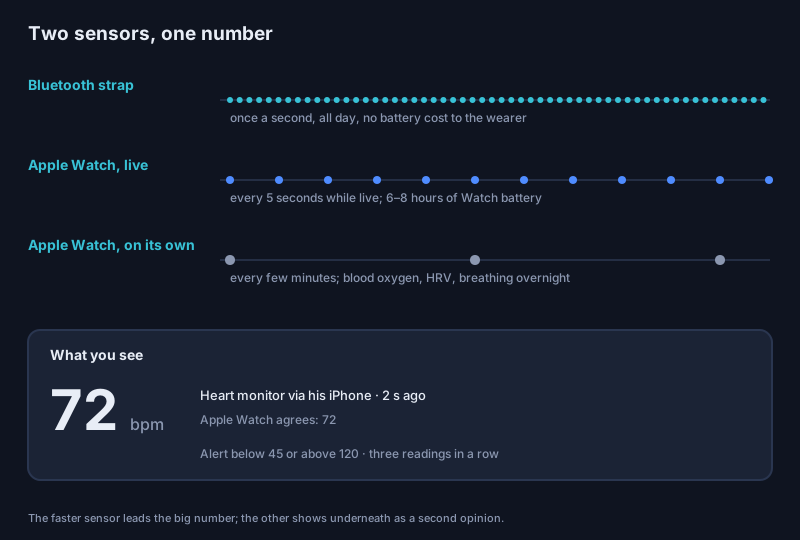
Both at once is the strongest arrangement, and the screen handles it: the faster sensor drives the big number and the other shows beneath it as a second opinion. When they agree, which is nearly always, you stop thinking about which is which.
What happens when something is wrong
The checking happens on the server the instant a reading lands, not on anyone's screen. You set the limits: heart rate below 45 or above 120 is the default, blood oxygen under 90, breathing outside 8 to 24, blood pressure, temperature. Three readings in a row outside the line, so a single stray beat does not wake anyone up, and an alert goes out.
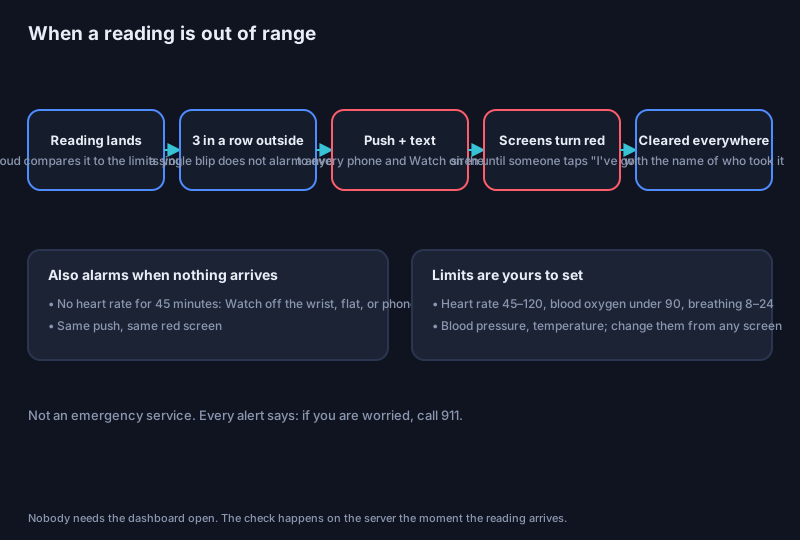
Out means four things at once. A push notification to every phone and Apple Watch on the list. A text message to the same people. Every open dashboard, anywhere, turns red, shows the number and the reason, and sounds a siren that does not stop until someone taps I've got it. And that tap clears it on everyone's screen together, with the name of who took it, so three siblings do not each call the same pharmacy.
There is one more alarm, and it is the one I care about most: silence. If no heart rate has arrived for forty-five minutes, the strap is off the wrist, or the phone is dead, or something worse, and the same alert fires. A monitor that goes quiet without telling you is worse than no monitor.
It is not an emergency service and it does not pretend to be. Every alert says the same thing: if you are worried, call 911.
What it will never do
This is the part I would ask you to read even if you skip the rest.
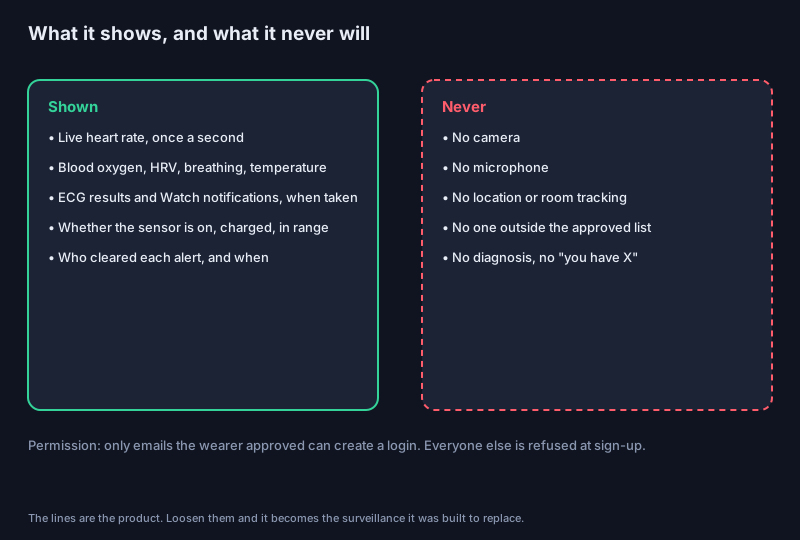
No camera. No microphone. No location. Only people the wearer has approved can create a login; everyone else is refused at the door. And it does not diagnose. It will tell you a number is outside the range you set, or lower than his usual overnight. It will never tell you he has a condition. That is a doctor's sentence, and the credibility of a tool like this depends on never borrowing it.
The reason is simple. The people most likely to need watching are the people most likely to resent being watched. A heartbeat on a screen is something a proud eighty-year-old can live with. A camera in the bedroom is not. The whole design is an attempt to give the family peace of mind without taking anything from the person who is the reason for it.
What it is for
The parent who insists on living alone, and the child who agreed on the condition that there be some way to know. The spouse with a heart condition whose partner still has to go to work. The brother who took the night shift of worrying because he is in the earliest time zone. The night nurse at a small care home who would rather glance at a wall than walk the hall every twenty minutes. And, honestly, anyone who wears a strap and wants their own number on a screen across the room.
Building it with AI, and staying in front of it
Most of the code in this system was written with an AI assistant, and I want to be precise about what that was like, because the stories I read about it are either breathless or sneering and it was neither.
What it did well: the parts that are mostly knowledge. The Bluetooth heart-rate standard is a published document, and the listener that speaks it came out right the first time. The server-side rule that waits for three bad readings before alarming, the shared acknowledgement, the alarm screen, the caregiver app's sign-in and live socket: all of it compiled and worked, and the whole thing moved from an idea to a live number on my counter in a working day.
What it got wrong, and this is the useful part: it was wrong in ways that looked exactly like being right. In one afternoon the AI regenerated a project file and silently dropped the setting that lets the app be signed and installed; the build said it succeeded, and the next step failed. When it installed a test copy on my own phone, my own heart rate started showing up on the dashboard as his, because nothing in the design had imagined the caregiver carrying the wearer's app. The AI did not notice. I noticed, because I was looking at the number and it was mine.
So the rule I have landed on is this. The AI is extraordinary at the middle of the work and unreliable at the edges, and the edges are where the harm is. I do not let it decide what the product is, what it refuses to do, or what counts as done. I ask it to explain every change before it makes one on a live system, and I make it show me the result rather than tell me. Staying in front of it does not mean knowing more than it does. It means knowing what I want, checking what I get, and never confusing a confident sentence with a verified one. That, by the way, is also the entire discipline of being a notary, which is the subject of the next piece.
Where it goes
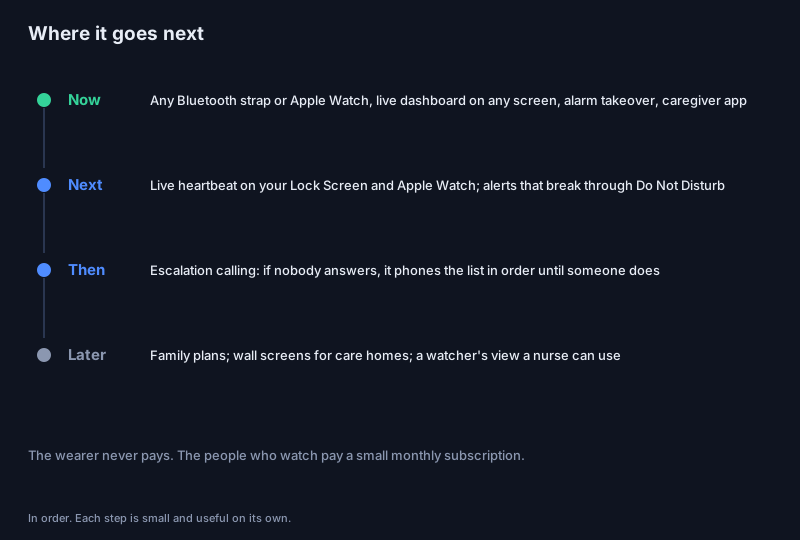
Next is the heartbeat on the caregiver's lock screen and Apple Watch, and alerts that break through Do Not Disturb. After that, escalation: if nobody taps the alert within a few minutes, the system phones the list in order, in plain words, until a person picks up. Then family plans and a version for the wall of a care home.
The business is deliberately simple. There is no hardware to sell; the wearer uses the strap or Watch they already own, and the wearer never pays. The people who watch pay a small monthly subscription, in the range of what the better heart-rate apps already charge. If you would like to be among the first families to use it, or you run a care home and want the wall version, the sign-up is on the build page, and I will write back myself.
What I am building, and why
Everything I make lives in the same neighborhood. Tools that protect the older people we love and help us look after them, the way this one does, from 450 miles away or from four blocks. Software that keeps them from being scammed, because the people who prey on the elderly are using automation and the defenses should too. And the camera work I wrote about last week, so that ordinary people know what is being recorded on their streets and who is looking at them from behind those dark lenses. Different projects, one question: can technology be on the side of the person it is pointed at?
Go look at the number. It is still 72.